
Are you an industrial designer or part of a design production team? Enjoy a streamlined workflow for form finding and accuracy in Rhino 9! Whether you’re creating complex transitions, control point massaging, achieving surface continuity or analyzing surfaces, check out Rhino 9’s toolset. Read on…
Creation & Modeling
Patch
We’ve all been there: The deadline is nearing, but just that pesky gap keeps you from sending out the part to your client.
 Patch
solves complex surfacing problems quickly. Create untrimmed and multi-sided surfaces that reach up to curvature continuity to neighboring surfaces. Fit surfaces through point clouds and mesh with ease. Goodbye, late-night office hours. Welcome Patch!
Patch
solves complex surfacing problems quickly. Create untrimmed and multi-sided surfaces that reach up to curvature continuity to neighboring surfaces. Fit surfaces through point clouds and mesh with ease. Goodbye, late-night office hours. Welcome Patch!
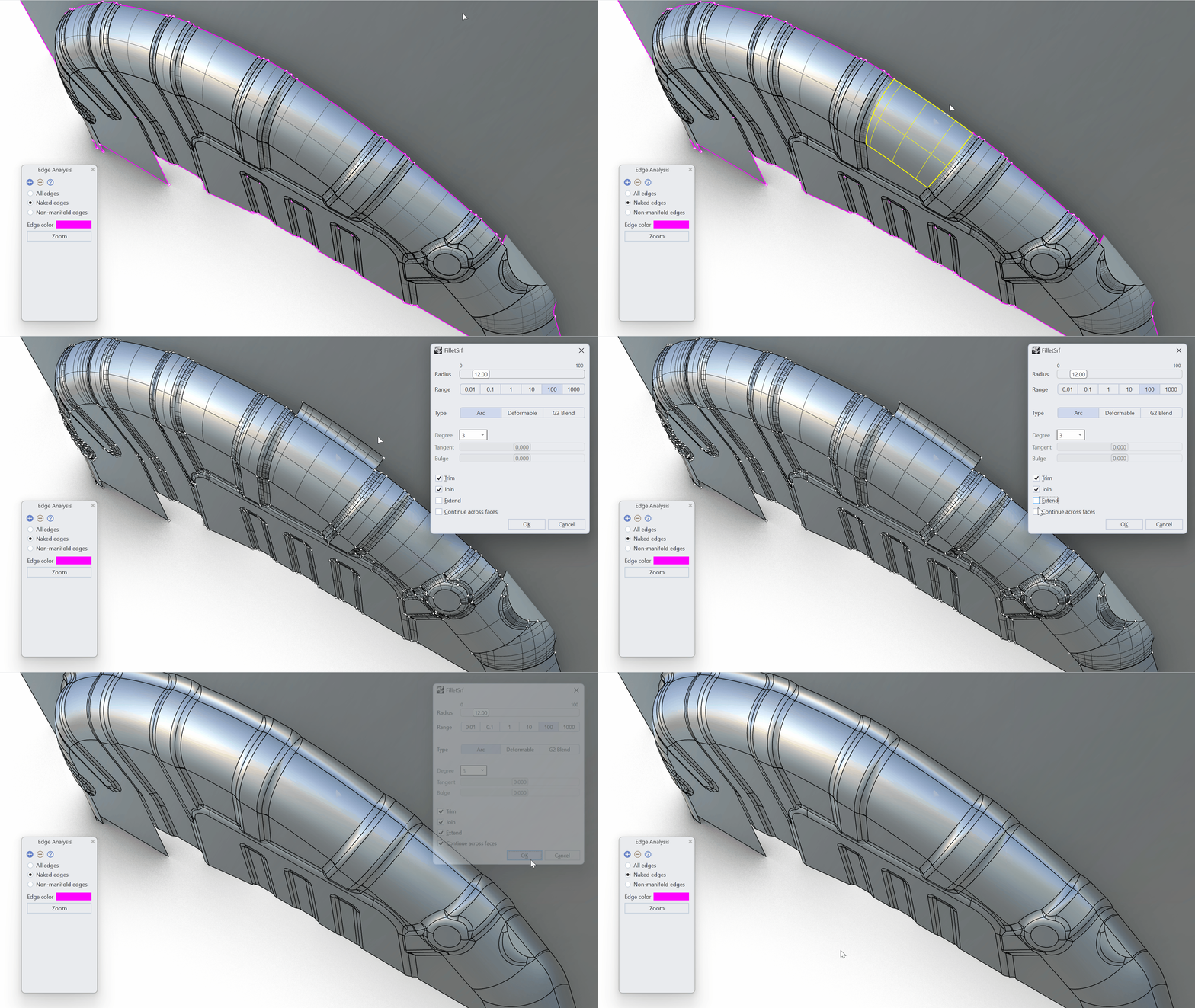
FilletSrf
 FilletSrf
suits a typical surface modeling workflow: Building fillets between non-connected (poly)surfaces. FilletSrf now automatically continues across tangent faces, saving you countless mouse clicks.
FilletSrf
suits a typical surface modeling workflow: Building fillets between non-connected (poly)surfaces. FilletSrf now automatically continues across tangent faces, saving you countless mouse clicks.
FilletEdge
Smooth corners, precise design!  FilletEdge
’s
FilletEdge
’s Setback corners deliver better performance for molding and provide an elegant visual flow.
Form Finding & Editing
Gumball UVN
Form-finding has become more intuitive with Rhino’s interactive  Gumball: Control Polygon
mode. Surface control point editing is a daily task for designers. Edit your product’s shape directly in the viewport without leaving the model to switch to the MoveUVN panel. Simply select control points while having the Gumball set to
Gumball: Control Polygon
mode. Surface control point editing is a daily task for designers. Edit your product’s shape directly in the viewport without leaving the model to switch to the MoveUVN panel. Simply select control points while having the Gumball set to Align to Control Polygon.
SoftTransform
Use the Boundary Constraints in  SoftTransform
to remove the first, second, or third row of control points from a falloff influence. Preserve your G0, G1, or G2 continuity to surrounding surfaces while making subtle changes to your product’s shape.
SoftTransform
to remove the first, second, or third row of control points from a falloff influence. Preserve your G0, G1, or G2 continuity to surrounding surfaces while making subtle changes to your product’s shape.
Proportional Editing in Rhino made simple! With a minimal selection set, apply falloffs to your geometry in a natural and proportional way. Couple it with UndoSelection to browse back and forth through selection sets and focus on refining your designs…
Rebuild
 Rebuild
reconstructs selected curves or surfaces to a specified degree and control point number. New adaptive rebuild technology matches the shape of the input curve with higher accuracy. The adaptive rebuild technology only applies to curves.
Rebuild
reconstructs selected curves or surfaces to a specified degree and control point number. New adaptive rebuild technology matches the shape of the input curve with higher accuracy. The adaptive rebuild technology only applies to curves.
Selection List
Selection of vertices, edges, faces or control points is how designers fine-tune their concepts. Rhino keeps your previous selections in memory. Use  UndoSelection
and
UndoSelection
and  RedoSelection
to move between previous selection sets without the hassle of having to reselect. A true workflow accelerator!
RedoSelection
to move between previous selection sets without the hassle of having to reselect. A true workflow accelerator!
Design Analysis
A design validation can only happen after a thorough analysis of the shape and connections between surfaces. Rhino 9 offers improved surface analysis tools for both visual and numerical analysis. Accurate analysis lets you modify the surfaces that make up an object to ensure they meet the required G0, G1, or G2 continuity, as required.
Zebra
Consumer product 3D models often consist of multiple surfaces that must connect with a specific edge continuity.  Zebra
’s new
Zebra
’s new Static mode helps you evaluate these surface transitions by displaying fixed Zebra stripes while the model is rotated.
Global Edge Continuity
 GlobalEdgeContinuity
offers a concise overview of your model’s surface continuity with both visual and numerical feedback. You can easily detect surface edges that need attention. Edit and verify until your edges meet in G0, G1, or G2 accurately.
GlobalEdgeContinuity
offers a concise overview of your model’s surface continuity with both visual and numerical feedback. You can easily detect surface edges that need attention. Edit and verify until your edges meet in G0, G1, or G2 accurately.
Surface UV Indicators
Enabling
Control Points
on a surface now displays UV directions. These new direction indicators are ideal for intuitive editing with Gumball UVN
,  MoveUVN
or SoftTransform
to enable faster, more accurate form finding.
MoveUVN
or SoftTransform
to enable faster, more accurate form finding.

