Break a list of items into consecutive fragments based on splitting indices and a fragmentation method.
This is a more advanced list splitting tool than the Split List component, in that it allows for the creation of multiple output lists, as well as some control over the splitting behaviour at splitting indices.
Note that prior to fragmenting the list, all splitting indices are internally sorted and duplicates are removed. This means the values inside the Ix input are treated as a set, rather than as an ordered collection.
Any part of the list which precedes the first index or succeeds the final index which automatically be included as the first and last sub-lists.
The available splitting methods are listed below:
| Value | Name | Info |
|---|---|---|
0 |
Begin At Index | Fragments range from the given indices up to, but not including, the next index. |
1 |
End At Index | Fragments start after the given indices and range up to the next index. |
2 |
Between Indices | Fragments only contain the items in between the indices. Items at indices disappear. |
3 |
Including Indices | Fragments contain the items in between and at indices. Items at indices are duplicated. |
Example
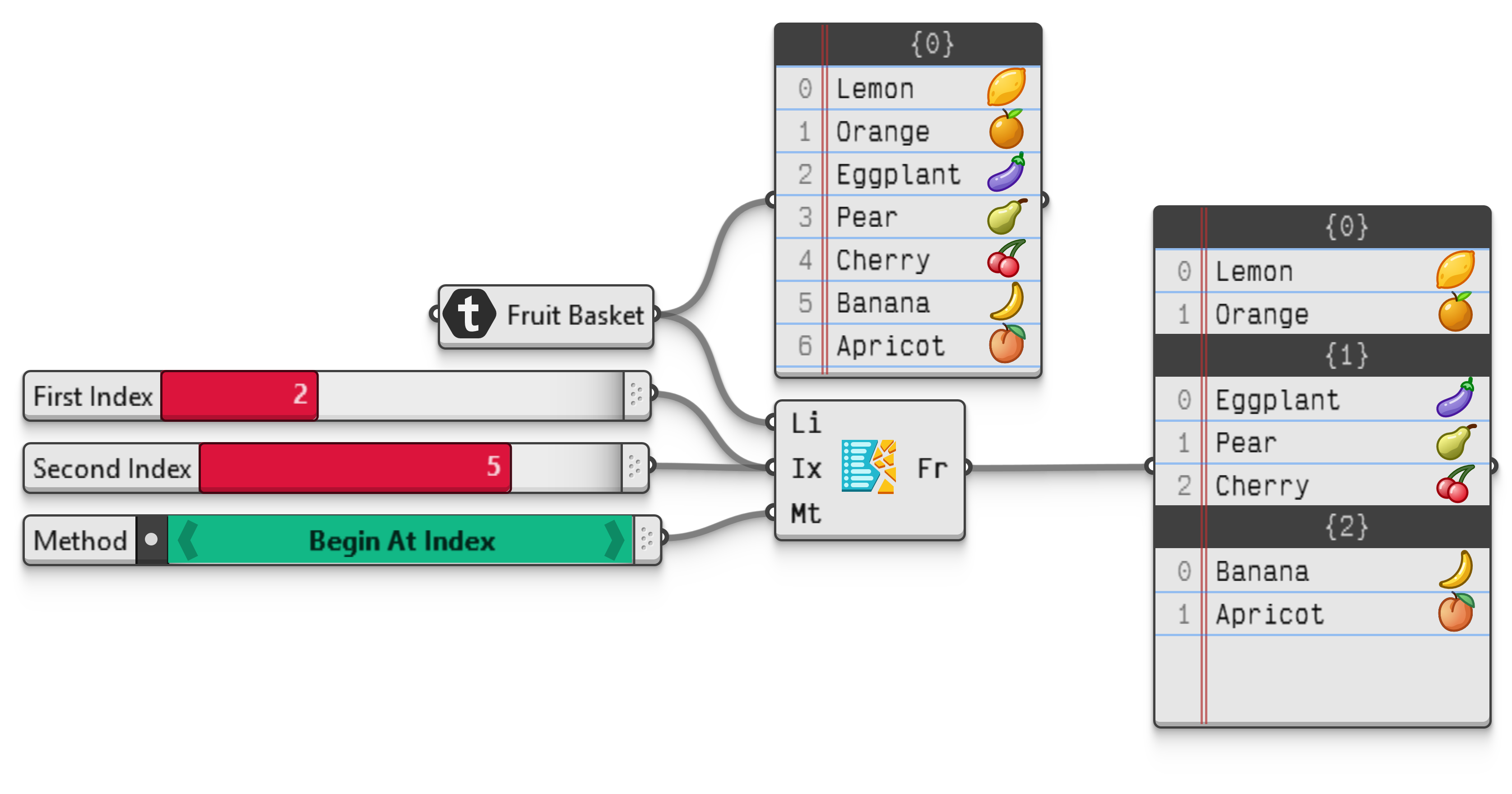
To see how these four methods differ in their outcomes, consider the list of fruit below with splits at indices 2 and 5.
| index | 0 | 1 | 2 | 3 | 4 | 5 | 6 |
|---|---|---|---|---|---|---|---|
| value | 🍋 | 🍊 | 🍆 | 🍐 | 🍒 | 🍌 | 🍑 |
If the output fragments begin at the splitting indices, then the result will contain this grouping of values (🍋🍊), (🍆🍐🍒), (🍌🍑). The first fragment covers all list items which come before the first splitting index, and the next two fragments both start at the given splitting indices and continue until they either run into the next splitting index or the end of the list.
When the fragments end at the indices, the splits occur one item later, yielding (🍋🍊🍆), (🍐🍒🍌), (🍑). These two behaviours are quite similar and could be mimicked by adding or subtracting 1 from all indices, barring some special cases where indices occur at the start or end of the list.
The between and including methods however differ subtantially in their outputs, in that the former will omit values at indices entirely from the output, while the latter duplicates values at indices. For example if we only consider the values between indices, the three output fragments are limited to (🍋🍊), (🍐🍒), (🍑). Note that the eggplant and the banana are missing from these fragments since they occur at indices 2 and 5 in the original list.
Similarly, the eggplant and the banana occur twice if we include values at splitting indices in the fragments on either side, yielding (🍋🍊🍆), (🍆🍐🍒🍌), (🍌🍑).