Bulk Assign
00000000-abe6-42a1-b9f7-20d0fd10dc06
This page was generated from the component’s built-in descriptions. An in-depth article has not been written for it yet.
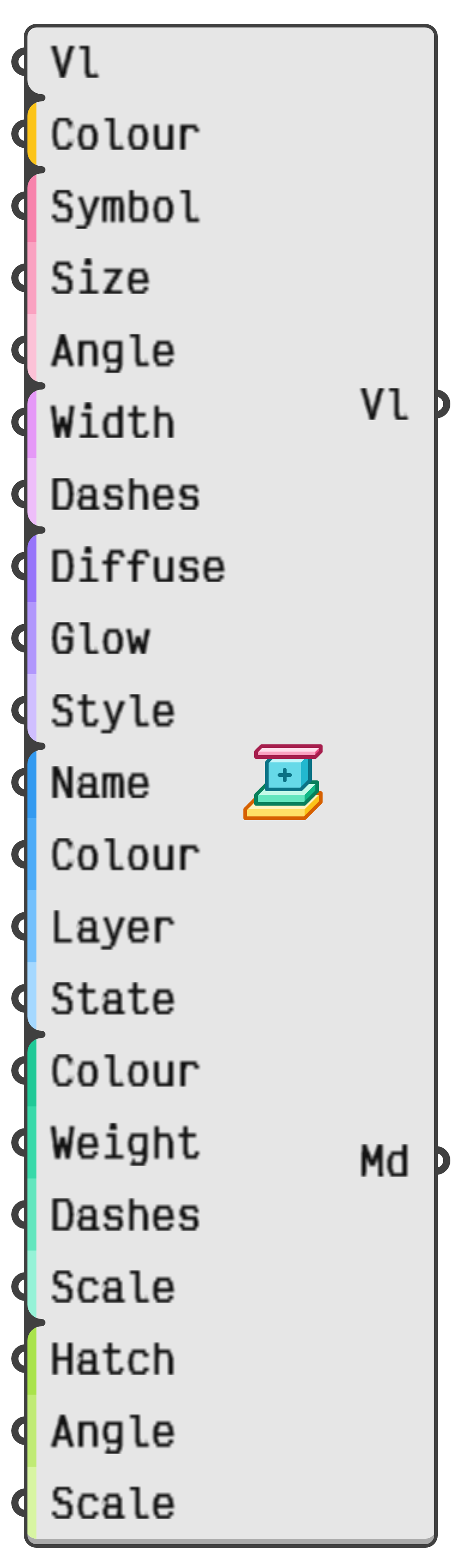
Assign a collection of meta data values all at once. Note that each input is optional and can be hidden.
- Vl → Optional value to assign meta data to.
- Colour → Optional display colour for wire elements.
- Symbol → Optional display symbol for points.
- Size → Optional display symbol size for points.
- Angle → Optional display symbol angle for points.
- Width → Optional line width for curves.
- Dashes → Optional line pattern for curves.
- Diffuse → Optional diffuse colour for shaded faces.
- Glow → Optional glow factor for shaded faces.
- Style → Optional styling for shaded faces.
- Name → Optional name for baked objects.
- Colour → Optional colour for baked objects.
- Layer → Optional layer for baked objects.
- State → Optional state for baked objects.
- Colour → Optional plot colour for baked objects.
- Weight → Optional plot weight for baked objects.
- Dashes → Optional plot dash style for baked objects.
- Scale → Optional plot line style scale for baked objects.
- Hatch → Optional section hatch for baked objects.
- Angle → Optional section hatching angle for baked objects.
- Scale → Optional section hatching scale for baked objects.