Draft by Verena Vogler · 2026-11-19
As a  Grasshopper
developer, you can port a Grasshopper 1 (GH1) plugin to Grasshopper 2 (GH2) much faster by splitting the work between two AI tools. Claude Code rewrites the source. Rhino MCP tests the result in a live Rhino. This tutorial walks through a practical workflow and shows which parts are easy to hand to the AI, and which need careful human attention.
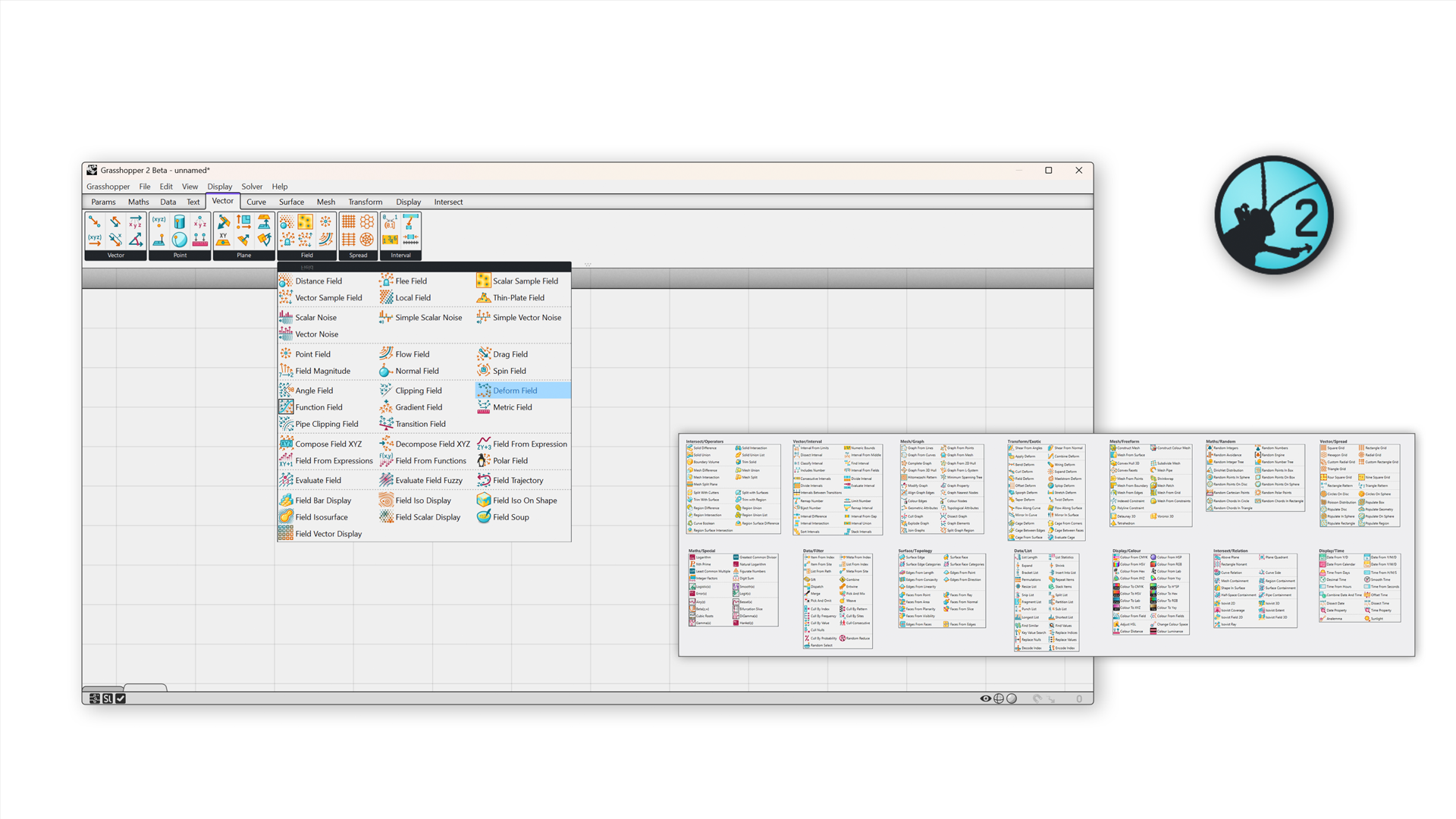
Why now? GH2 ships with Rhino 9, and GH2 does not load GH1 plugins. Rhino 9 also moves to .NET 10 as its default runtime and changes parts of the UI and SDK. Older Rhino plugins may still load for now, but that is not guaranteed. If you ship a Rhino or Grasshopper plugin, plan for this.
You will learn to:
- Check how much of your plugin actually has to change.
- Set up a GH2 project next to your GH1 project.
- Port parameters, types and components with Claude Code.
- Test each ported component side by side in Rhino with Rhino MCP.
- Decide what stays with you, the human.
What you’ll need
You need common developer tools, a Claude subscription, and Rhino 9 where both versions of Grasshopper are included.
| Tool | What it does in the port |
|---|---|
| Rhino 9, with GH1 and GH2 | Runs both canvases side by side, so you can compare old and new behaviour |
| Your GH1 plugin source (C# project that builds) | The starting point. It stays untouched; the GH2 port lives next to it |
| Visual Studio or Visual Studio Code, plus the .NET SDK | Builds the GH2 .rhp. For example, Visual Studio 2022 with Claude Code in its terminal |
Rhino.Templates and the Grasshopper2 NuGet package (beta) |
Scaffolds the GH2 project and supplies the GH2 SDK |
| GitHub (or any Git host) | A branch for the port, so every AI change is reviewable and reversible |
| Claude subscription with Claude Code | Edits the source, builds, reads compiler errors, iterates. Use it from a terminal, your IDE, or Claude Desktop |
| Rhino MCP (RhinoAI) | Lets an AI assistant drive a running Rhino and Grasshopper session. Connect it to Claude Desktop or another MCP client |
Before you start: know what changes
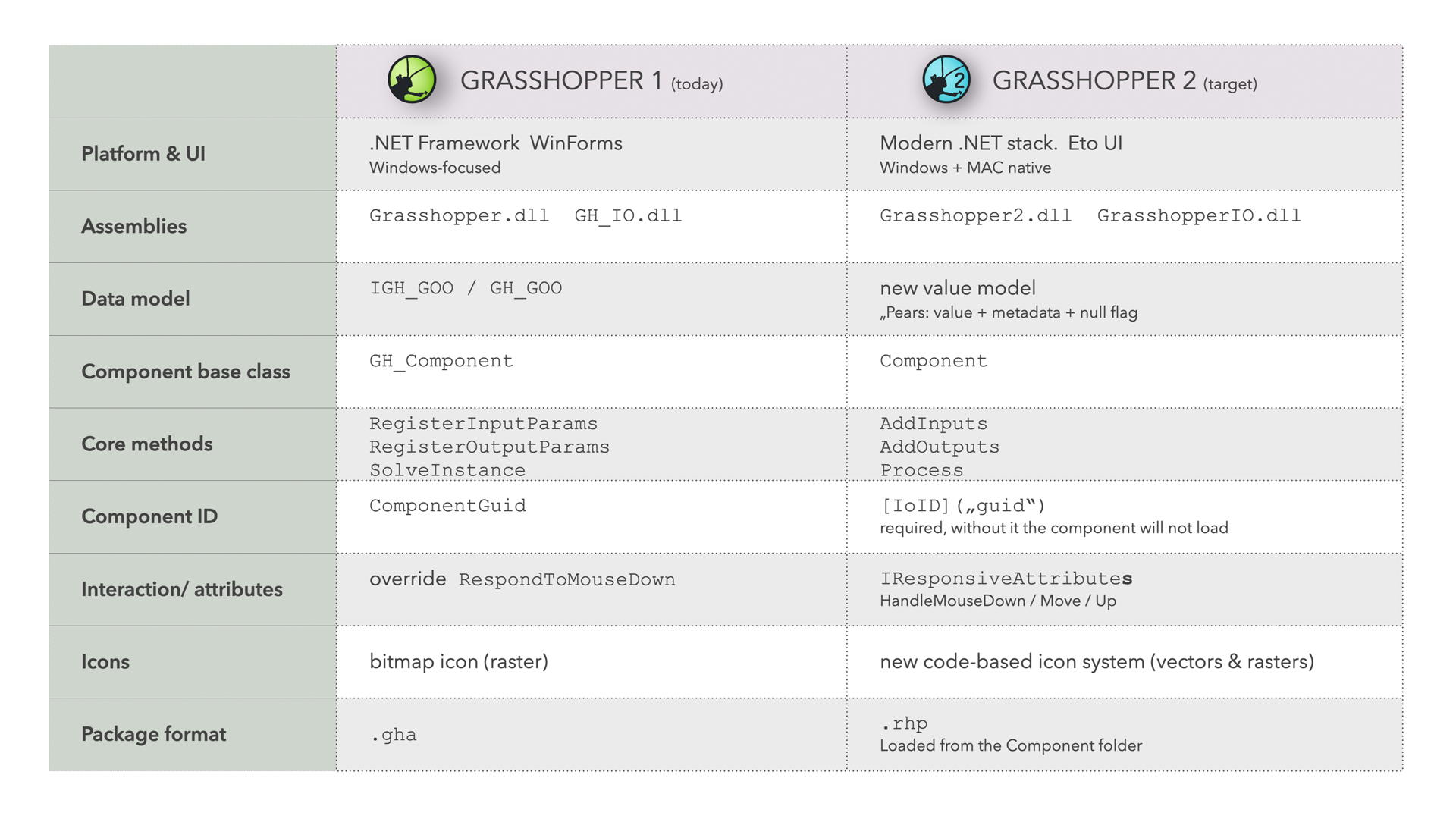
GH2 is not a version bump. It is a full rewrite, so a GH1 plugin cannot simply be recompiled. Nearly every layer you build against changed:
Check your plugin architecture first. The key idea is to only change the Grasshopper layer. Many plugins are layered. Only the top layer talks to the Grasshopper SDK, so only that layer has to be rewritten:
- Grasshopper layer (C#,
.gha): components that read inputs, call your core code and write outputs. This is what you port. - Core library (C#/.NET): your domain logic. Stays as it is.
- Native code and services (for example C++ engines, Python pipelines, web APIs): stay as they are.
If each layer is built and versioned on its own, linked through published packages (such as NuGet or Yak) rather than direct source references, the port stays contained to the top layer. The thinner that layer, the smaller your migration.
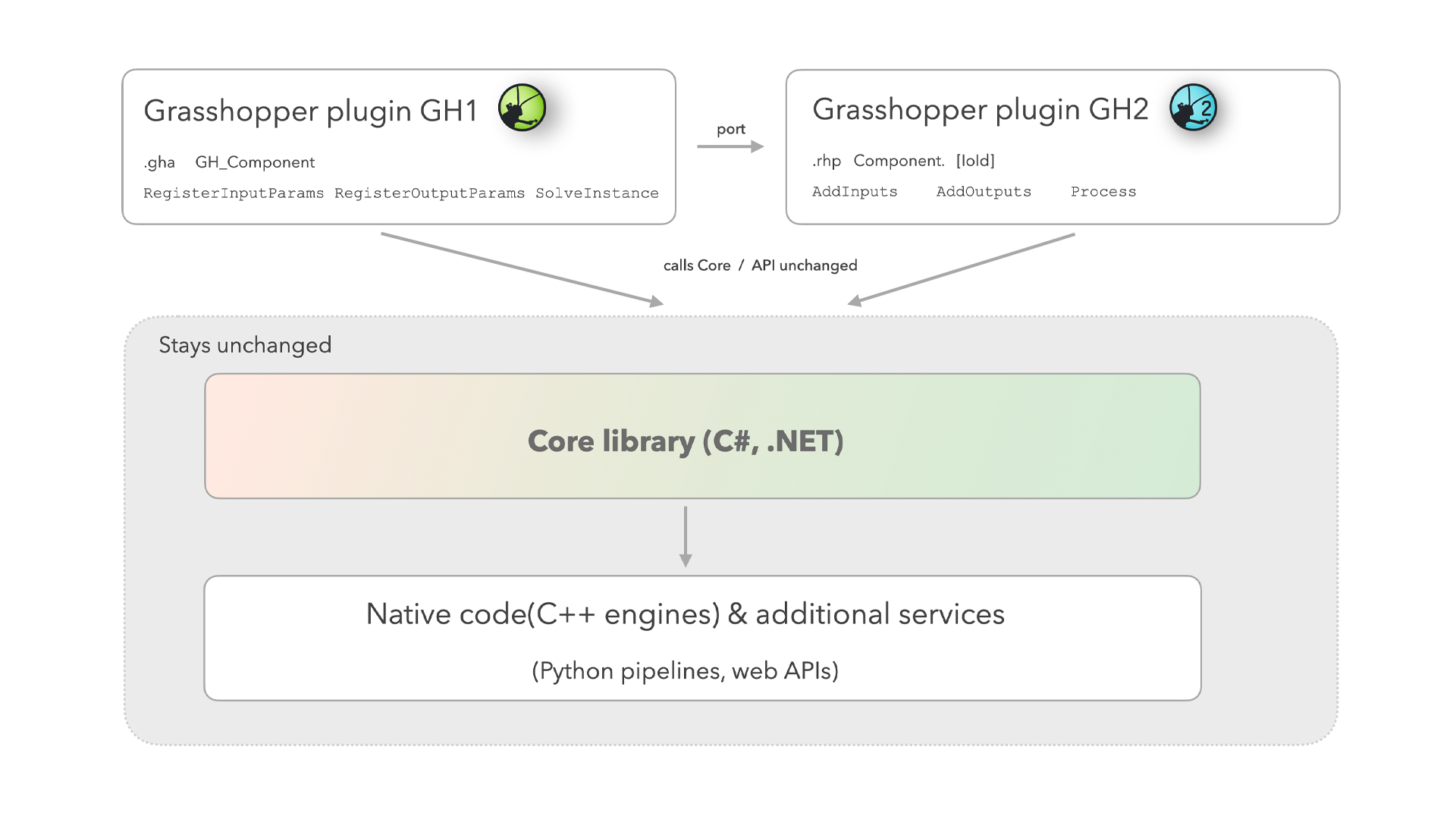
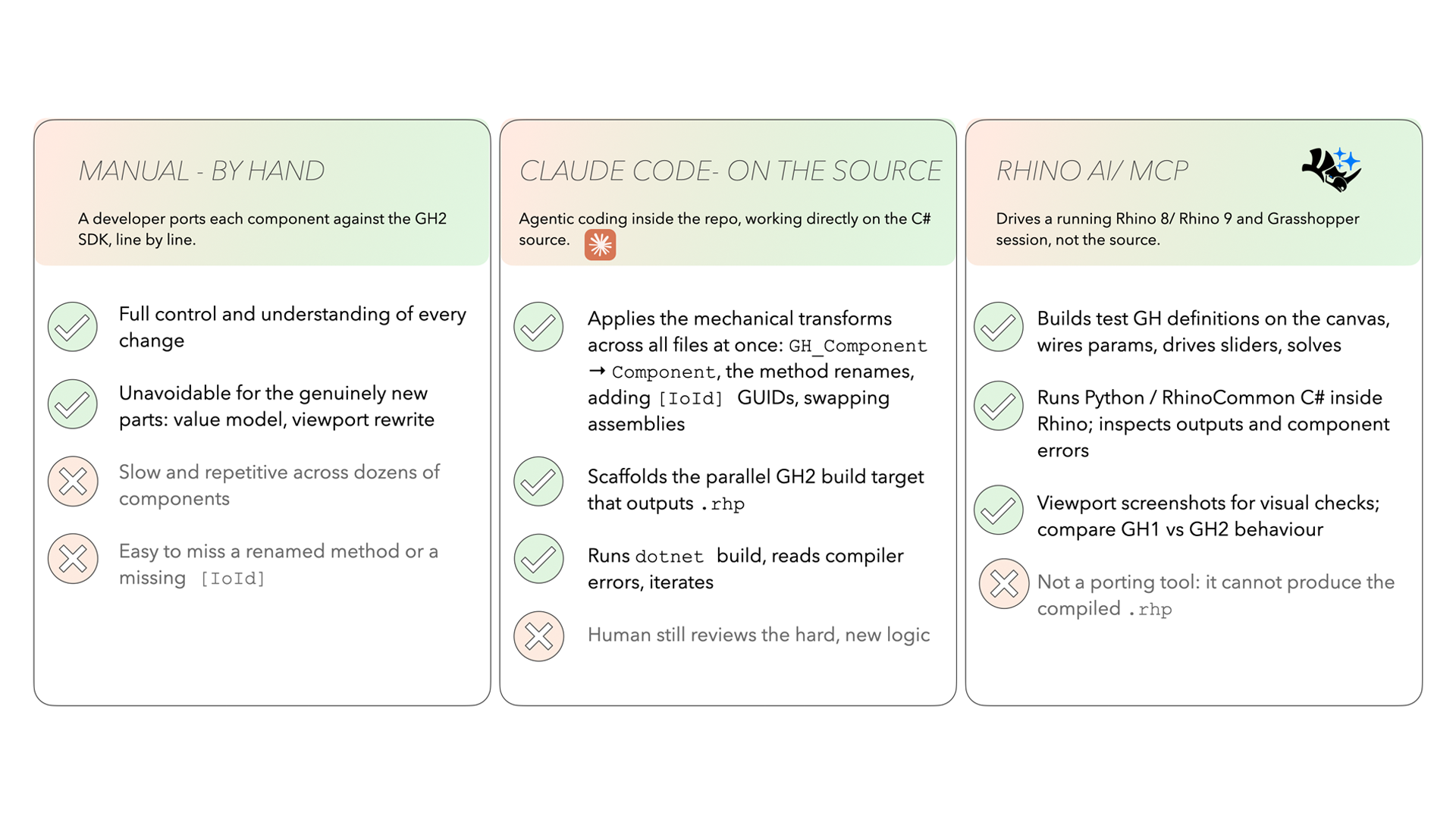
SolveInstance, consider moving it into a separate library first. Your port then shrinks to the same thin layer.Choose your approach. There are three ways to do the rewrite. In practice you combine them.
Step by step: the migration loop
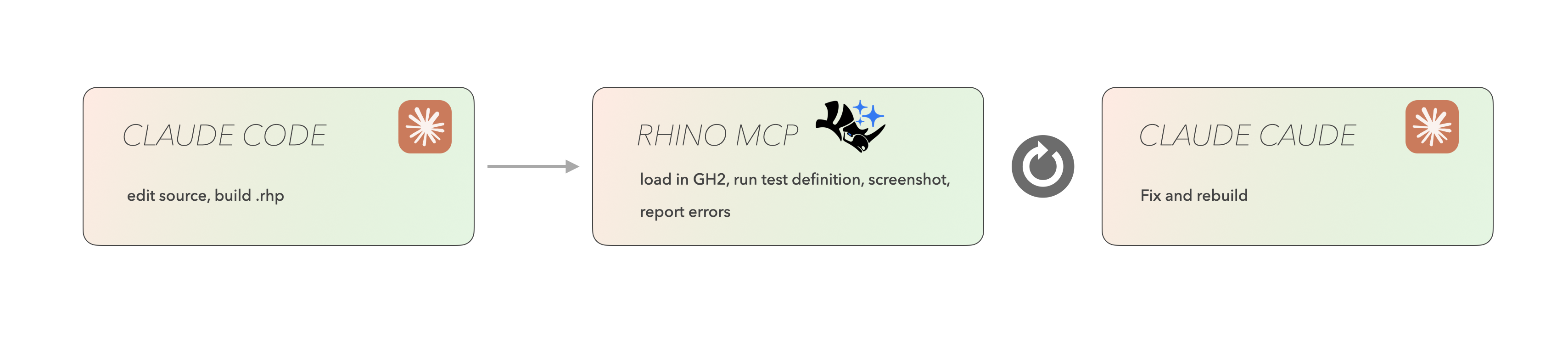
The two AI tools form a loop. Claude Code edits the source and builds the .rhp. Rhino MCP loads it in GH2, runs a test definition, takes a screenshot and reports errors. Those go straight back to Claude Code. You stay in the middle and own the judgement calls.
1. Set up the GH2 project
Work on a Git branch and keep the GH1 project untouched; the GH2 project lives next to it. Use the Rhino.Templates extension to create a GH2 project, which pulls in the Grasshopper2 package:
dotnet new install Rhino.Templates
dotnet new gh2 --IncludeSample false -n MyPlugin.Grasshopper2 -o gh2
Add your core library as a dependency. Set a launch profile that opens Rhino 9 with GH2 when you run.
2. Port parameters and Goos first
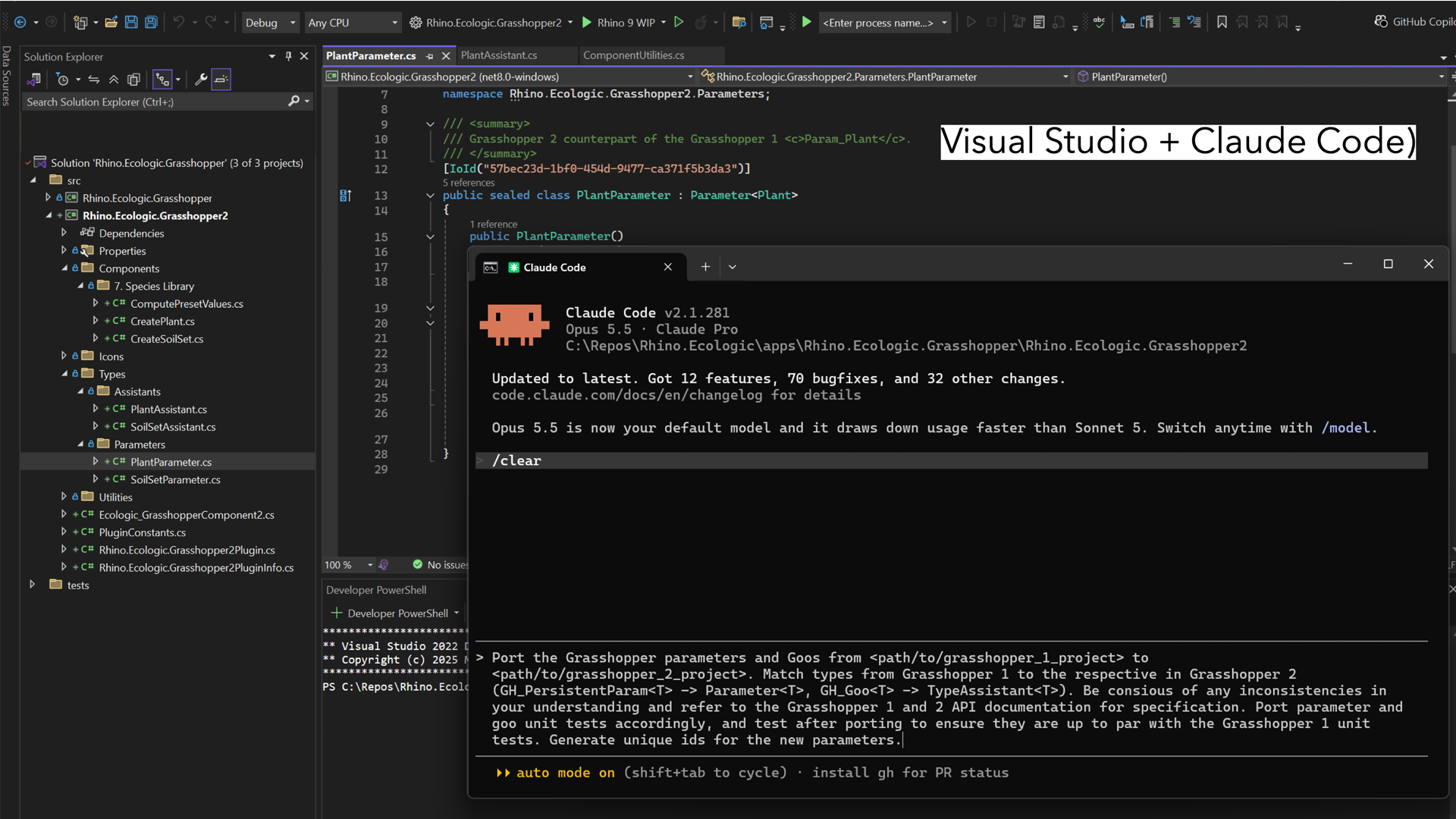
Components depend on your custom types, so port those first. GH_PersistentParam<T> becomes Parameter<T>, and GH_Goo<T> becomes TypeAssistant<T>. Give each a new [IoId] GUID and port their unit tests too. Run this in Claude Code from the project directory:
Port the Grasshopper 1 parameters and Goos from <gh1_project> to <gh2_project>. Match types from Grasshopper 1 to the respective in Grasshopper 2 (GH_PersistentParam<T> -> Parameter<T>, GH_Goo<T> -> TypeAssistant<T>). Be conscious of any inconsistencies in your understanding and refer to the Grasshopper 1 and 2 API documentation for specification. Port parameter and goo unit tests accordingly, and test after porting to ensure they are up to par with the Grasshopper 1 unit tests. Generate unique ids for the new parameters.
3. Port components
For each component, match the types, add an [IoId], bring over the icons, keep tab and plugin naming consistent, and pull in any helper methods and NuGet packages it needs. In Claude Code:
Port the <name> Grasshopper 1 component to Grasshopper 2, from <gh1_project> to <gh2_project>. Match the types from Grasshopper 1 to Grasshopper 2's types. Refer to the Grasshopper 1 and 2 API documentation for specification. Generate a unique id for the new component and port the icon assets, using the vector version where available, embedded into the built artifact. Be consistent with tab and plugin naming. Where methods from utility or helper classes are called, port them to the new project, respecting the target framework, and add NuGet packages as needed. Use Rhino MCP to convert the test definitions <dir>. After porting, run the definition(s) to validate the ported component behaves according to specification.
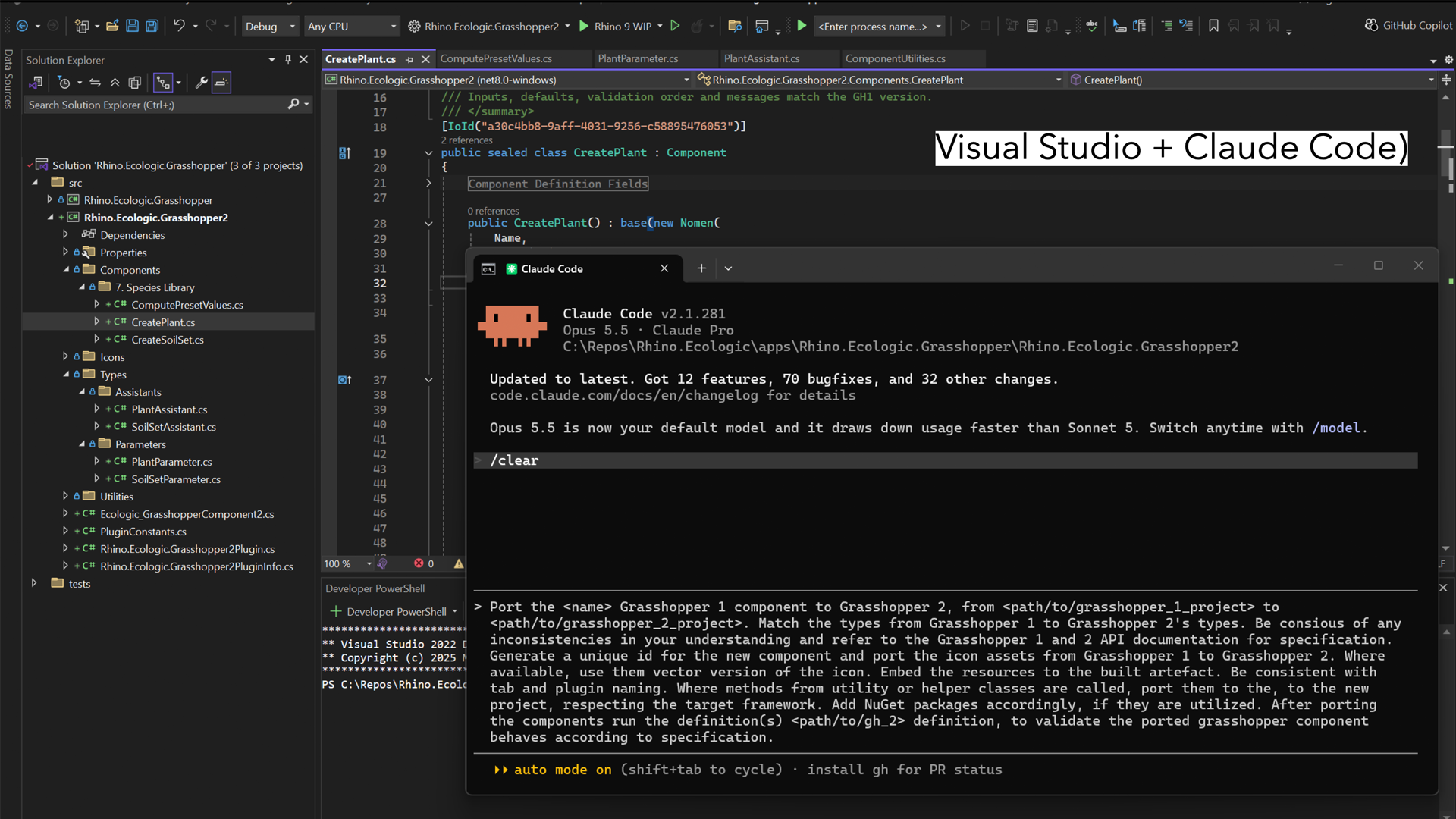
4. Wrap the steps into a skill
Once the prompts work, save them as a Claude Code skill. After that, one line handles a whole component: convert this <name> component from GH1 to GH2. You rarely type the full prompts again.
5. Test in a live Rhino with Rhino MCP
Give the agent your GH1 test definition (or let it write a test definition for you). It opens both canvases, rebuilds the definition in GH2, solves both versions and compares the outputs. Move sliders on either side and check that the values stay in sync. Ask it to report deviations rather than hide mismatches. Through Rhino MCP:
Port this Grasshopper 1 definition <gh1_definition> to <output>. Parse the definition and understand its components and layout. Match the parameters and maintain both the layout and grouping. Maintain references to geometry or external files. If run via Rhino, launch Grasshopper 2 and load the produced definition. Add a step for serializing and exporting fixtures for testing and easy repetition.
Saved fixtures make every later test repeatable. McNeel’s developer guide suggests strict comparison rules: list and tree counts must match exactly; numbers must agree within a tolerance; geometry must match on bounding box and element count; any structure or count mismatch is a hard fail.
6. Fix, rebuild, repeat
Feed errors and screenshots back to Claude Code, rebuild, and test again. When a component passes, move to the next one. Keep a list of anything skipped and why.
What’s easy: hand it to the AI
Most of a GH1-to-GH2 port is mechanical and repetitive, and that is where AI does best. A mature plugin can be a whole wall of components, parameters and icons that all need the same treatment. Hand these off:
- Renames across every file.
GH_ComponenttoComponent;RegisterInputParams/RegisterOutputParams/SolveInstancetoAddInputs/AddOutputs/Process. - IDs. Adding an
[IoId]GUID to every component and parameter, so none silently fails to load. - Assemblies and packages. Swapping
Grasshopper.dllforGrasshopper2.dlland adding the NuGet packages that helpers need. - Scaffolding. Setting up the parallel GH2 build target that outputs the
.rhp. - The compile loop. Running
dotnet build, reading compiler errors and fixing them. - Icons and naming. Porting icon assets (vector where available) and keeping tab and plugin names consistent.
- Test definitions. Rebuilding GH1 definitions on a GH2 canvas, keeping layout and grouping, and saving fixtures.
What needs careful attention
AI does the boring 80% well. The 20% that matters is new design work, and it stays with you.
- Custom data types and the value model. Porting your Goos to GH2’s new value model is a design decision, not a rename. Check that the agent picked the correct GH2 type, not the closest-sounding name.
- Viewport and preview code. Custom viewport previews have to be rewritten against the GH2 and Eto viewport APIs. Treat custom display, attributes and mouse interaction as new code.
- Data trees. Branch and path handling is the most common source of definitions that solve but are wrong. Compare branch and item counts, not just values.
- Component IDs. IDs are hard to change once users have files that reference them. The prompts in this tutorial generate new
[IoId]GUIDs; McNeel’s developer guide suggests reusing the GH1ComponentGuidso existing documents stay identifiable. Decide this once, up front. - Builds clean, broken on the canvas. A plugin that compiles can still misbehave in Grasshopper. Test in a real Rhino, not just the compiler. The Rhino MCP loop is what catches this.
- Missing equivalents. When a component has no clean GH2 equivalent, the agent should skip it and list it, not write a stub that silently solves to nothing.
- The .NET target. Rhino 9 defaults to .NET 10. Changing the target framework is one line in the project file. The real work is making sure your own libraries and every dependency support .NET 10, since some packages may not yet, or may have changed their APIs.
- Reviewing generated code. Read every diff. Agents know GH2 less well than GH1, so they may guess. Ask them to say when they are unsure and to check the GH1 and GH2 API docs.
Next steps: ship it
A port is finished when users can install it. Publish the GH2 .rhp to the Rhino Package Manager for one-click installation (see the Yak guide), update your food4Rhino listing, and announce the plugin on the Rhino Plugins forum.
Resources
- Upgrade GH1 to GH2 definitions with Rhino&AI: porting
.ghfiles and comparing canvases. - Upgrade GH1 components to GH2 (developers): McNeel’s plugin porting guide, with fixtures and comparison rules.
- RhinoAI on GitHub: the public Rhino MCP repo.
- Grasshopper2 NuGet package (beta).
- GH2 template (CSGrasshopper2) and Your first GH2 component.
- Grasshopper 2 beta announcement on the McNeel forum.
- Based on a talk by Verena Vogler at the Rhino Developer Meeting, Barcelona, September 25, 2026.

